Gauntlet PK
"Gauntlet PK" is the rotating stage version of PK. On the "Scoring Games" page, pick PK, then set the mode to "Rotating stage (King of the hill)" and you have it. Two, three or four people can stand on stage at once (2 by default). The first few people in the queue go on stage (the first one is the defender) and everyone else waits below. When the round timer ends, people rotate according to the swap rule you chose:
- Winner stays (everyone else leaves): the top scorer stays on stage and everyone else steps down, replaced in order by the people waiting. If the defender wins, they keep the throne and their win streak goes up by 1; if a challenger finishes first, they take the throne and become the new defender.
- Last place leaves: only the lowest scorer steps down and the first person waiting takes the seat. Everyone else stays on stage for the next round.
With 2 people both rules give the same result: the winner stays and the loser is swapped out.
What viewers see
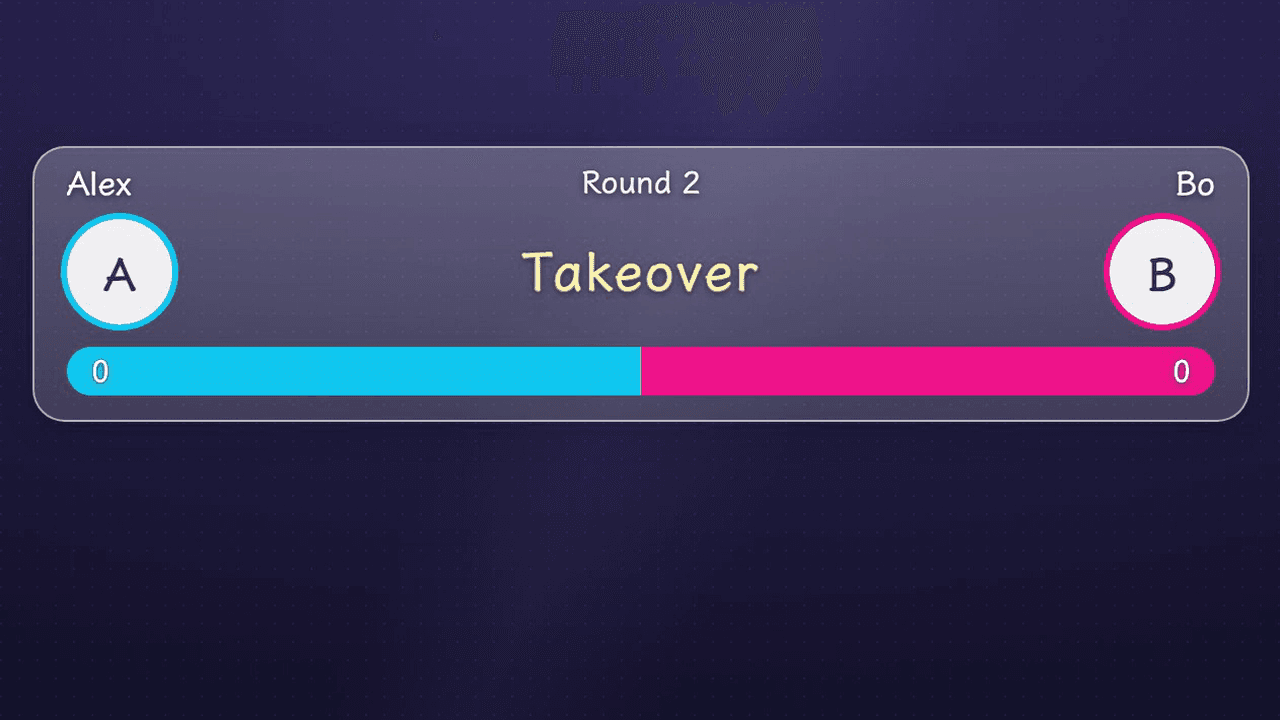
The display is a slim, semi-transparent bar. With 2 people: the top row has the defender on the left, the challenger on the right and the round number in the middle; the middle row has both avatars on the sides (the representative sticker sits under the avatar, so viewers who cannot tap a host to send a gift still know which sticker to send) and the countdown in the center; the bottom row is a thin two-color health bar with both scores at the ends. Host name, avatar and representative sticker each have their own switch: with the avatar off, the sticker serves directly as that side's identity, and with the name off that slot is simply left blank, with no text. With 3 to 4 people the same bar becomes one column per person: the top row shows the round number and the countdown, and each column below has a name, a representative sticker (or avatar, with the sticker again shown under the avatar), a thin progress bar in their own color and their score. The status appears only in the center countdown slot: "Ready" before the start, "Defended" or "Takeover" briefly at the end of each round (with 3 to 4 people, the people who left the stage that round are listed next to it), and "Match over" when the whole match ends.
The gauntlet uses the same "PK Duel" overlay link as PK Duel (a full-screen transparent browser source, paste it once), so switching between "One and done" and "Rotating stage" needs no new source. PK's three effects show up in the gauntlet as well: a critical hit from a single big gift lands on the opponent, a last-second finisher that turns the score around in the final seconds lands on the health bar, and a freeze locks the trailing side. The rules are the same as PK Duel, and all three appear only when exactly 2 people are on stage. With 3 to 4 people no effects play.
Setup before going live
Pick the game
Open the "Scoring Games" page, choose "PK" in step 1, then under "Game" choose "Rotating stage (King of the hill)". For a regular PK that ends after one match, choose "One and done". When you switch over from PK, the number of people you picked comes along.
Pick the number of people and the swap rule
At the top of the workbench, pick how many people are on stage (2, 3 or 4) and the swap rule ("Winner stays (everyone else leaves)" or "Last place leaves"). When you add people to the queue, the on-stage count goes up automatically to match (up to 4), and the 5th person onward waits in line; to keep someone waiting on the side, add everyone first and then set the count back down by hand. These cannot be changed while a round is running; wait until it ends.
Build the queue
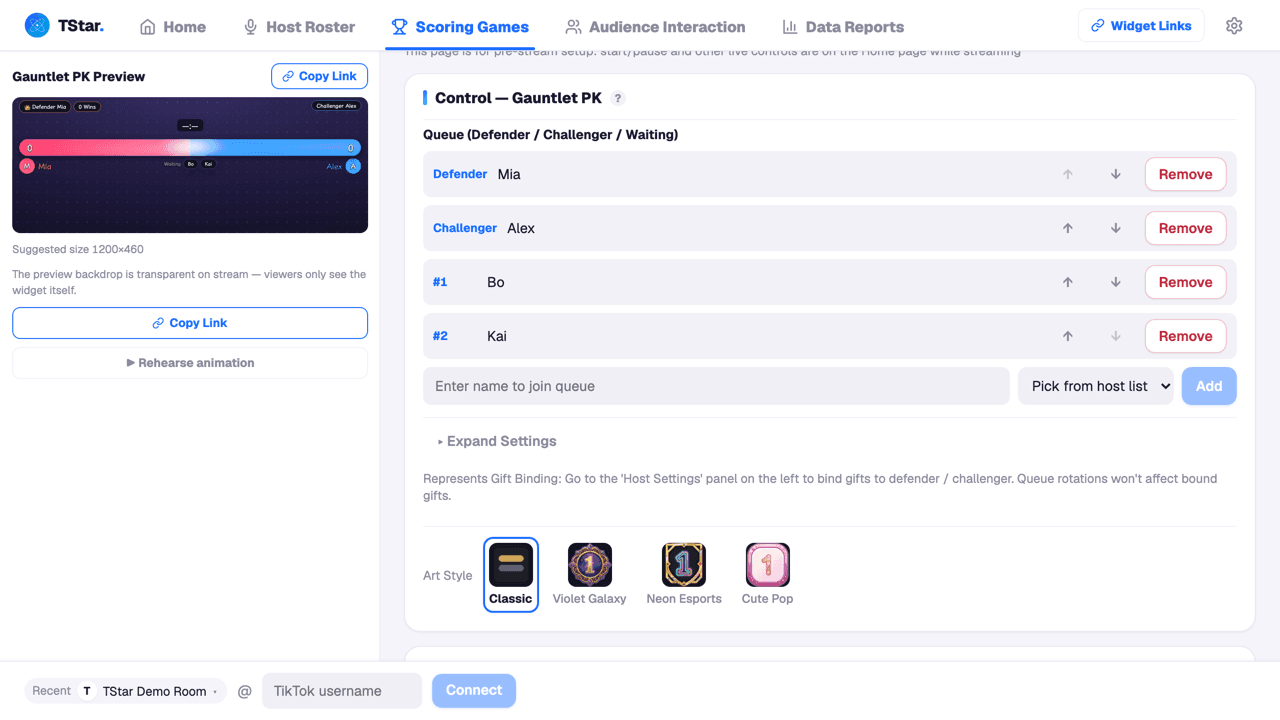
Add members to the queue in the workbench below. The first few, according to the number of people, take the stage (the first is the defender, then the challengers) and the rest wait in order. Use the up and down arrows to reorder and "Remove" to take someone out. Picking people from the host list is recommended, because that brings in their avatars, so viewers who tap a host's avatar to send a gift are recognized correctly; guests whose names you typed by hand have no avatar and can only be scored through their representative sticker. Give each member one "Sticker" as their representative sticker, and a sticker can only belong to one person.
(Optional) Adjust the game rules
"Game Rules" is expanded by default. A tie is always a draw, and the same defender and challengers play again. "Score bar identity" has three separate switches, host name, avatar and representative sticker, all on by default. With 3 to 4 people, if things get crowded, turn one of them off; this only affects the display, not the scoring.
Below the game rules are three groups of effect settings, "Critical-hit effect", "Finisher effect" and "Freeze", exactly the same set as PK Duel: each has its own master switch, plus the critical-hit style and single-gift threshold, the finisher style and the seconds that count, and the freeze threshold (the whole group shows only when 2 people are on stage). These settings are saved with the slot and are shared with the PK Duel side.
Save
Click "Save to Home". The setup (queue plus game rules) is saved into the slot and pinned to Home automatically, and you run the show from Home when you go live. "Save to Home" only pins this card to Home and does not change what viewers see; to show it to viewers, go to Home and tap this card.
Running it during the stream
Back on the Home live control panel, once every seat on stage is filled, use the seconds picker to set how long this round lasts (it must be set again every time you go live; the default is 180 seconds), then click "Start" to begin for real, which is when the countdown starts. Before the start, the stream shows "Ready" automatically; while paused, while tallying and when the round is over it shows "Paused", "Wrapping up" and "Round over" respectively. When time runs out the result is decided automatically and people rotate by the swap rule. On a tie the draw is shown, the people on stage stay where they are, the scores reset to zero and they play another round. While a round is running the queue is locked; click "End" to close the round early, or let it run out. To skip the current challenger and bring on the next one, use "Skip Challenger". To start the whole match over, click "Reset" (the queue, the scores and the win streaks are all cleared, and you are asked to confirm).
Where scores come from
Scores count only the diamonds reported officially by TikTok, and a streak gift is counted once, after the gifting action ends (when the streak is released). Which person a gift counts for is decided in this order: if it is a representative sticker of someone on stage, it counts for them, and that viewer is remembered as backing them; if the viewer tapped the avatar of a host on stage, it counts for that host; if the viewer has already sent someone on stage a sticker this round, it counts for that person; otherwise it does not count. Gifts sent by tapping the avatar of someone waiting below do not count toward the gauntlet score, and the income is credited to that host. At the start of every round, who each viewer backs is cleared and starts over. The moderator can also change who a particular gift counts for in the gift feed.
Common questions about this game
Q: Do queue members have to be picked from the host list? A: No. Members picked from the host list have avatars, so a viewer who taps their avatar to send a gift also scores for them; guests whose names you typed by hand have no avatar and can only be scored through their representative sticker.
Q: Can I cut in line or edit the queue while a round is running? A: No. While a round is running the queue is locked. Click "End" to close the round early, or wait for the natural rotation to finish, and then you can edit the queue again.
Q: With 3 or 4 people, who is the defender? A: The person first in the queue starts as the defender. With "Winner stays", whoever finishes first in each round is the defender of the next round.
Q: Can I play a single match and finish, with no swapping? A: Yes. On the "Scoring Games" page, under PK, set the mode back to "One and done" and it is the regular PK Duel. Both modes share the same overlay link, so you do not need to paste anything again when you switch.
Q: Does the gauntlet have PK's critical hit, finisher and freeze? A: Yes. All three appear just like in PK Duel, and their settings sit below the game rules in the gauntlet workbench, as the same set as on the PK side. All three work only when 2 people are on stage; with 3 to 4 people no effects play and the settings area is collapsed. The "Preview critical hit" and "Preview finisher" buttons under the preview on the left work in the gauntlet too.
Last updated · Written and maintained by Novus